How to Convert YouTube Cooking Videos to Recipes in Seconds (Free & AI Methods)
 By Eggcelllent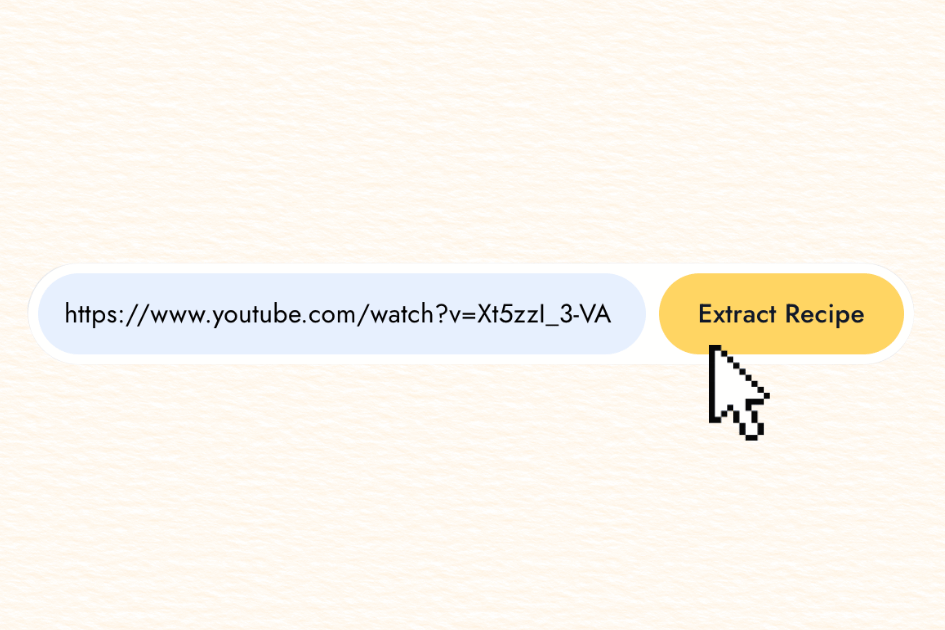
Stop pausing. Stop scribbling. Start actually cooking.
We've all been there. You're scrolling through YouTube, find an incredible pasta recipe, and think "I'm making this tonight." Then reality hits—you're hitting pause every 10 seconds, frantically scribbling ingredient amounts on a grocery receipt, and your phone dies because the video's been playing for 45 minutes.
YouTube cooking videos are great for inspiration but terrible for actual cooking. There's a better way to turn any YouTube video into a usable recipe.
Why YouTube Recipe Videos Are Actually Terrible for Cooking
Don't get me wrong—cooking videos are entertaining and inspiring. But the moment you try to cook from one? Everything falls apart.
The pause-rewind loop. You miss the garlic amount, hit rewind, miss it again. Before you know it, you've watched the same 30 seconds five times and your pasta water is boiling over.
No reference while cooking. Your hands are covered in raw chicken, you can't touch your phone, and you forgot whether they said two cloves or two tablespoons of garlic.
Lost in your watch history. Your YouTube history is a graveyard of recipes you'll never find again. Good luck locating that "really good chicken thing" from three weeks ago.
Shopping list nightmare. You have to pause cooking, open Notes, type out each ingredient, then switch back. Repeat 15 times. It's exhausting.
Can't modify anything. Want to double the recipe or cut the salt? Good luck doing mental math while your onions burn.
The Solution: Convert YouTube Videos to Written Recipes
Instead of fighting with video players, you can extract the recipe into a clean, editable format. Here's what you get when you convert a YouTube cooking video to recipe format:
Cook at your own pace. Spend 15 minutes perfecting your knife cuts without missing what comes next. Let your dough rise without staring at a paused video. You control the timing.
A recipe card that works in your kitchen. Prop your phone on the counter and actually see your ingredients list. No grease on the screen. No pausing. No chaos.
Find your recipes later. Search for "that chickpea curry thing" and actually find it. Tag recipes by cuisine, meal type, or occasion. Revolutionary, I know.
One-click shopping lists. Instead of the pause-write-play-pause cycle, just tap a button and everything goes to your shopping app. Seriously satisfying.
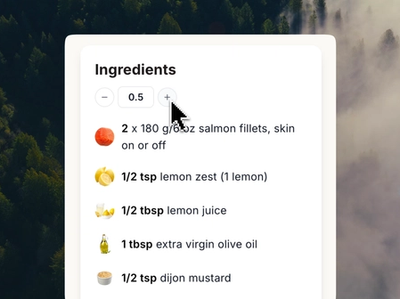
Edit and scale freely. Double a recipe? Change serving sizes? Swap ingredients? Just edit the text. No rewatching required.
3 Ways to Convert YouTube Videos to Recipes
There are three main approaches, and they're very different in terms of effort and results.
Method 1: Manual Transcription (The Hard Way)
Watch the video, pause constantly, write everything down, format it yourself in Google Docs or a notes app.
Time required: 20-40 minutes per recipe
Cost: Free
Only recommended if you genuinely enjoy the process :)
Method 2: AI Recipe Extraction (The Smart Way)
Copy the YouTube video link, paste it into an AI-powered video to recipe converter, wait about 10 seconds, and get a fully formatted recipe.
Time required: Under 30 seconds
Cost: Usually a few dollars per month, some free options available
What good AI extraction tools do:
- Separate ingredients from instructions automatically
- Let you edit
- Export to PDF, print, or copy and share with your family and friends
Method 3: YouTube Captions + Manual Cleanup (The Middle Ground)
Pull YouTube's auto-captions, copy the transcript, and format it yourself or ask ChatGPT.
Time required: 10-15 minutes
Cost: Free
What to Look for in a YouTube Recipe Converter
If you're going the AI route (which I recommend), here's what actually matters:
Clean formatting. You should get a properly structured recipe—not a wall of text. Ingredients separated from instructions, prep times included, serving sizes noted.
Editable output. You need to be able to change things, add notes, scale recipes. A tool that just spits out a static PDF isn't useful long-term.
Export options. PDF, print, shopping list integration, share links. The more ways you can use your recipe, the better.
Recipe organization. You can save them in one place.
How to Use a YouTube Recipe Extraction Tool (Step by Step)
This genuinely takes about 30 seconds:
- Find any YouTube cooking video
- Copy the video link from your browser or the YouTube app
- Paste it into your recipe extraction tool
- Wait 10-15 seconds for AI processing
- Review your extracted recipe
- Edit if needed (adjust quantities, add notes)
- Save, print, or export to your shopping app
- Cook from an actual recipe instead of a video
Works With Any YouTube Cooking Content
Whether it's a 30-minute tutorial from a professional chef or a quick 60-second YouTube Short, recipe extraction works across all YouTube cooking content:
- Full-length cooking tutorials and walkthroughs
- YouTube Shorts with quick recipes
- Professional chef channels
- Home cook vlogs
- International cuisine tutorials
Frequently Asked Questions
Can I edit the recipe after extraction?
Yes. It is fully editable - ingredients, amounts, instructions. The extracted recipe is your starting point, not a locked document.
Can I save and organize my extracted recipes?
Yes. You can save and organize within the eggcellent web app.
Is my recipe library private?
Yes. Your saved recipes are not publicly visible unless you specifically share them.
Does this work with YouTube Shorts?
Yes. Short-form cooking content on YouTube works just as well as full-length videos. The AI extracts ingredients and instructions regardless of video length.
How accurate is AI recipe extraction?
Very accurate for most cooking videos. AI is trained on cooking terminology and handles ingredients, measurements, and instructions well. You should always give your extracted recipe a quick review, but major errors are rare.
The Real Difference
YouTube has amazing recipe content—from professional chefs to home cooks sharing family recipes. But video is made for watching, not cooking. Converting YouTube videos to written recipes removes all the friction and lets you actually use what you discover.
Start Extracting YouTube Recipes Today
If you're tired of fighting with cooking videos, convert your first recipe right now. Paste any YouTube cooking video and get a written recipe in seconds.
Ingredients
- 2 cups flour
- 1 tbsp butter
- 3 eggs
- 1 tsp salt
- 2 cups milk
Instructions
Ready to start cooking smarter?
Sign Up Free
Create your free account—no credit card required
Copy Video URL
Find any cooking video on YouTube and copy its link
Extract & Save
Get a formatted recipe instantly
Your recipe library is waiting.
Have questions about converting YouTube cooking videos to recipes? Drop a comment or reach out—we're here to help.
Ready to extract your first recipe?
Try Eggcellent today and turn YouTube cooking videos into formatted recipes in seconds.
Get Started FreeRelated Articles
How to Use Eggcellent's Meal Planner to Organize Your Weekly Cooking
Meal Planning 101: A Beginner's Guide to Stress-Free Weekly Cooking
Smart Grocery List: How Aisle Mode Auto-Merges Your Ingredients