Smart Grocery List: How Aisle Mode Auto-Merges Your Ingredients
 By Eggcelllent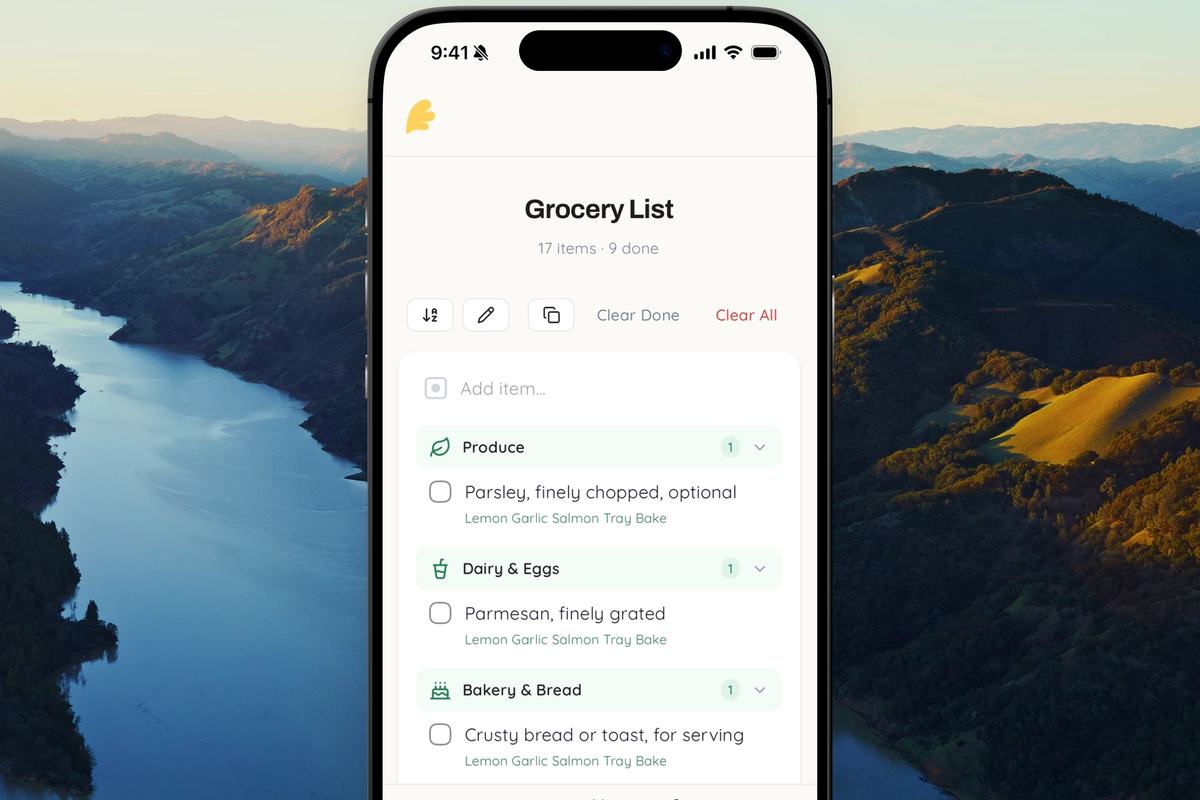
The grocery list problem nobody talks about
You find three great recipes for the week. You add all the ingredients to your grocery list. Now you're staring at a wall of text — garlic appears three times, olive oil twice, onions in four separate rows. The list is technically correct, but completely useless for actually shopping.
You end up mentally grouping items in your head, second-guessing quantities, and buying duplicates because you couldn't tell what you already had covered. We've all been there.
Introducing Aisle Mode
Eggcellent's grocery list now has a smart aisle view that automatically merges duplicate ingredients from different recipes into a single, clean entry. It's the default view, and it changes how you shop.
Duplicate ingredients merge automatically
When multiple recipes call for the same ingredient, aisle mode collapses them into one row. Instead of seeing:
- 2 cups flour (Banana Bread)
- 1 cup flour (Chocolate Chip Cookies)
- 3 cloves garlic (Pasta Sauce)
- 2 cloves garlic (Stir Fry)
You see:
- flour
- 2 cups — Banana Bread
- 1 cup — Chocolate Chip Cookies
- garlic
- 3 cloves — Pasta Sauce
- 2 cloves — Stir Fry
One row per ingredient. Each recipe's amount shown underneath in a compact breakdown. You instantly know what you need and where it comes from.
Organized by grocery aisle
Merged items are grouped into smart aisle categories — Produce, Dairy & Eggs, Meat & Seafood, Bakery & Bread, and more. Each section has its own icon and collapsible header, so you can work through the store section by section without backtracking.
The aisle classification happens automatically based on the ingredient name. Garlic goes to Produce. Butter goes to Dairy & Eggs. Olive oil goes to Oils & Condiments. You don't have to organize anything yourself.
One tap to check off, one tap to delete
When you check off a merged ingredient, every underlying entry gets marked as done at once. No need to find and check three separate "garlic" rows. Same with delete — removing a merged item clears all entries for that ingredient. It just works the way you'd expect.
How it looks in practice
Say you're meal prepping for the week with three recipes: a chicken stir fry, a pasta bake, and a simple salad. After adding all ingredients, your aisle mode grocery list might look like:
Produce: garlic (3 cloves + 2 cloves), onion (1 large + 1 medium), bell pepper
Dairy & Eggs: cheese (1 cup mozzarella + ½ cup parmesan), eggs
Meat & Seafood: chicken breast
Grains & Pasta: penne, rice
Oils & Condiments: olive oil (2 tbsp + 1 tbsp), soy sauce
Instead of 15+ individual rows, you get a tight, scannable list grouped by where things are in the store. That's the power of aisle mode.
Need the recipe-by-recipe breakdown?
Aisle mode is the default because it's optimized for shopping. But sometimes you want to see exactly what each recipe needs — maybe to check if you already have everything for just one dish, or to remove a recipe's ingredients without touching the rest.
Tap the sort toggle in the toolbar to switch to Recipe mode. Your items unmerge and regroup under each recipe name. Switch back to Aisle mode anytime — your data stays the same, only the view changes.
A few more things we improved
While building smart merging, we also polished the rest of the grocery list:
- Clear All — One button to wipe the entire list when you're done shopping or starting a new week
- Better clipboard copy — Copying your list includes the merged format with per-recipe breakdowns
Try it with your next meal plan
The smart grocery list works best when you have ingredients from multiple recipes. Extract a few recipes, add their ingredients to your list, and watch duplicates collapse into clean, organized rows. It's live now on web and iOS.
Ready to extract your first recipe?
Try Eggcellent today and turn YouTube cooking videos into formatted recipes in seconds.
Get Started FreeRelated Articles
Recipe Converter: How to Scale Any Recipe Up or Down

Best Video-to-Recipe Tools in 2026 (Turn Cooking Videos into Recipes)

Never Forget an Ingredient Again: Eggcellent's Smart Grocery List Feature